Your mind deserves its own workspace.

Free · Your files, on your device

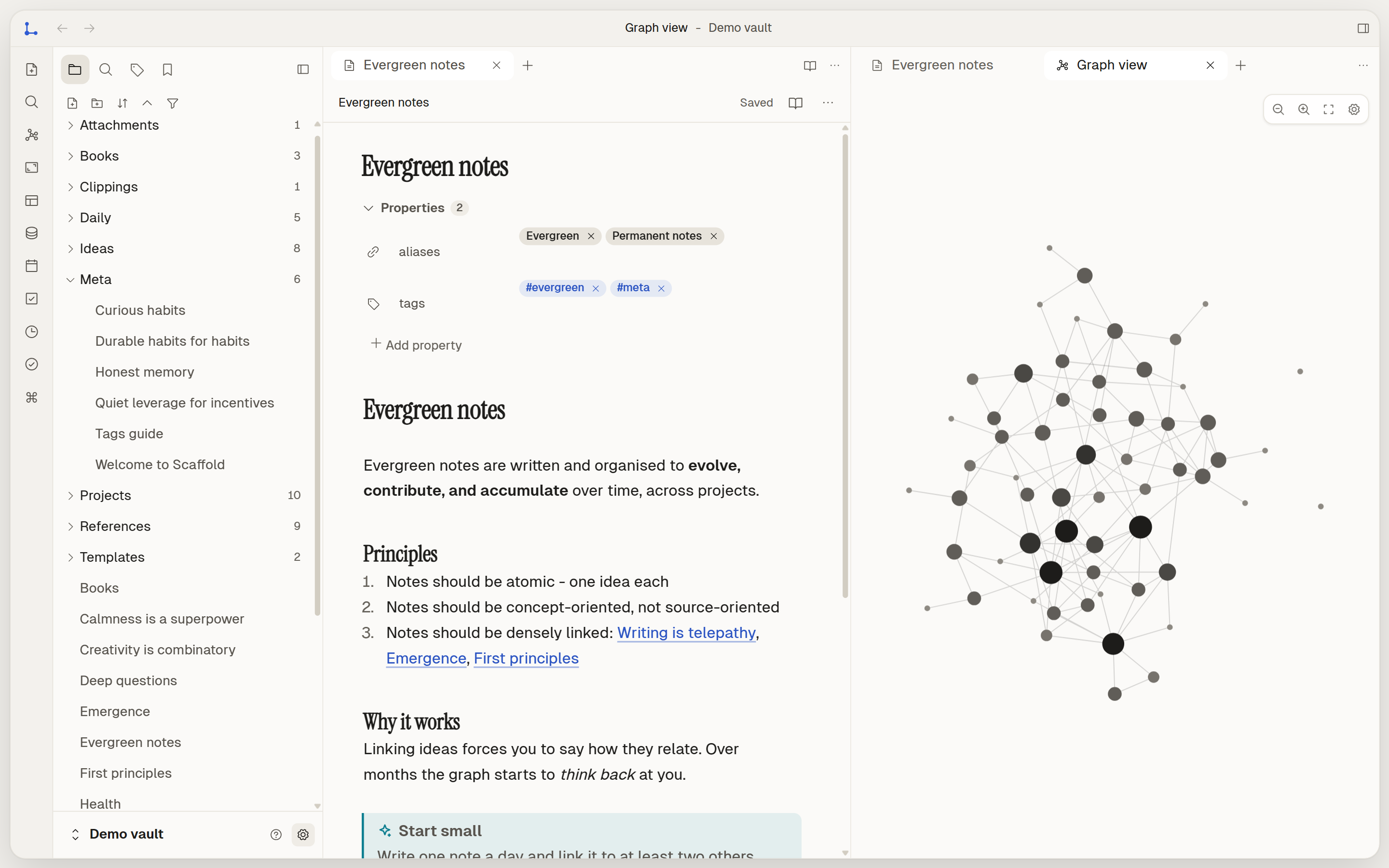
Screenshot of Scaffold on Windows with the demo vault: the file tree, an open note, and the graph of linked notes in a split pane beside it.
  • Link to a note

    [[Weekly re

    Weekly reviewJournal

  • Board · Doing 3

    Garden journal redesignDue 6 Nov · Mira

    Kitchen renovation budgetDue 18 Nov · Ines

  • Plain .md file

    Journal/Weekly review.md

    status: done

Real screenshot: Scaffold on Windows, demo vault, light theme.

Plan your day ☀️

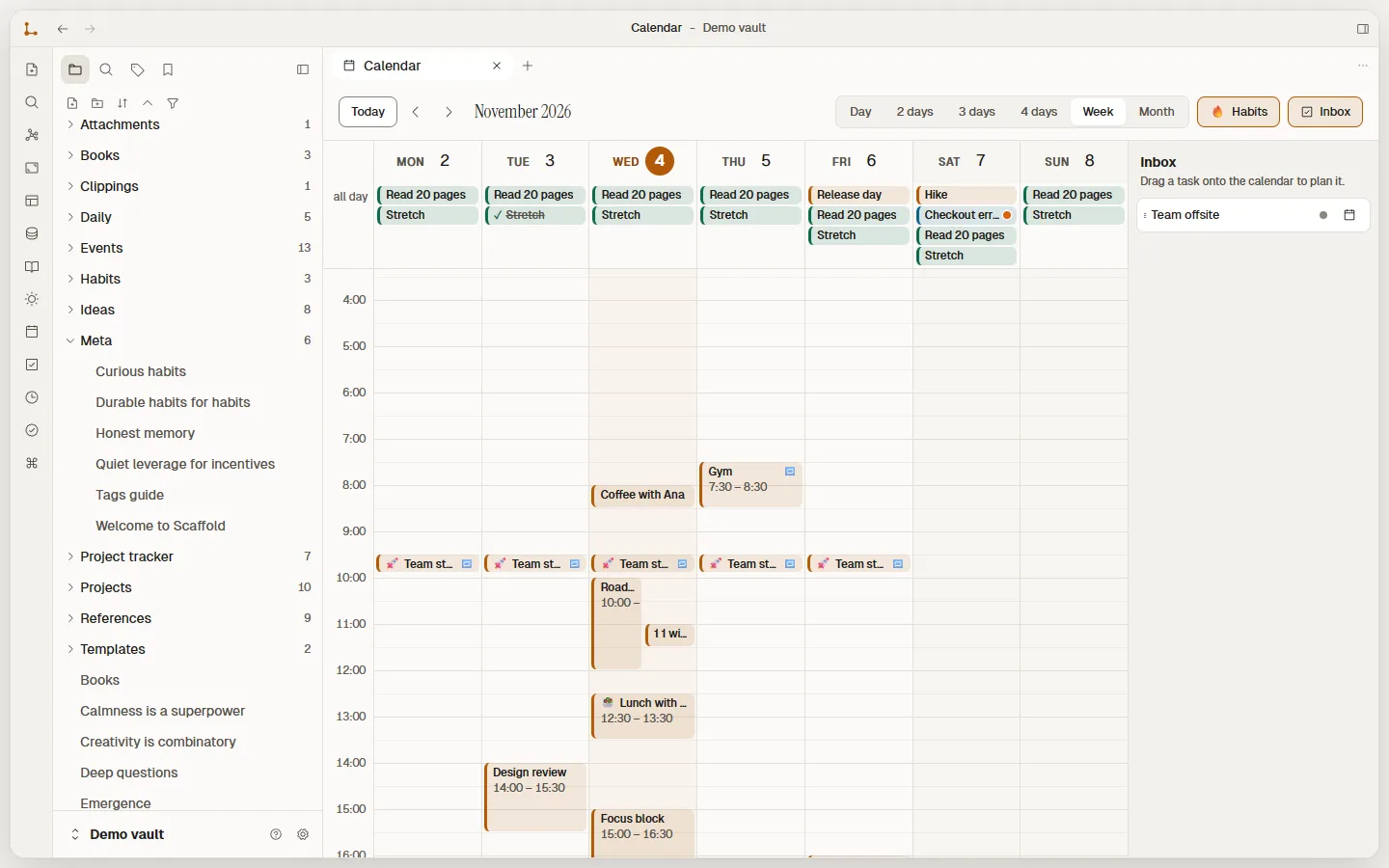
Scaffold calendar in Week view: habits such as Read 20 pages in the all-day row, a repeating Team standup every weekday, Coffee with Ana, Lunch with Rin and a Focus block, with the Inbox panel on the right.
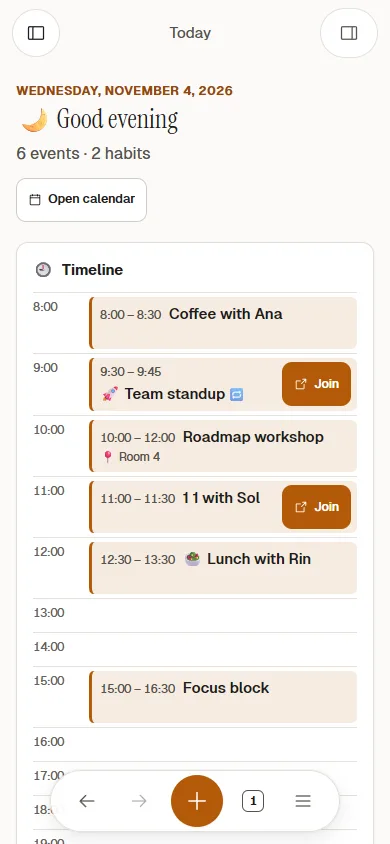
Scaffold on a phone: the Today page with the greeting and a timeline of the day, Team standup and 1:1 with Sol each showing a Join button.
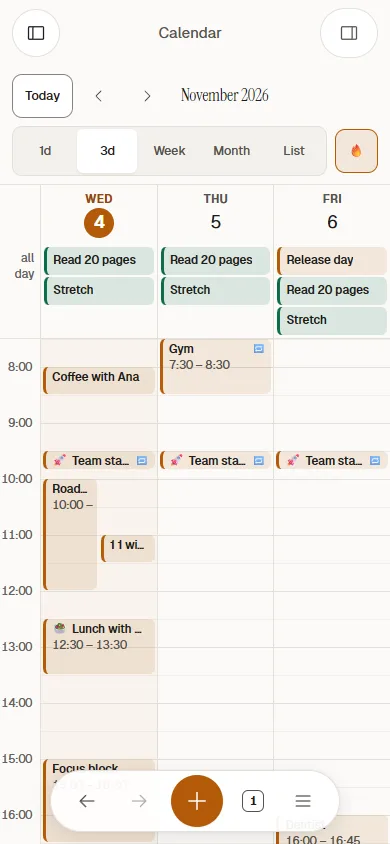
Scaffold on a phone: the calendar in the 3-day view, Wednesday to Friday, with habits at the top and timed events below.
Real screenshots: Scaffold 0.2.0, demo vault.
  • Drag it where it goes

    Day, 2, 3 or 4 days, Week and Month. Drag to create, move or resize.

  • A Today page

    A greeting, your timeline, what's due and today's habits, on one screen.

  • Habits with streaks

    Repeating events and habits. Tick one off and watch the streak grow.

  • Reminders

    On your desktop and your Android phone, with Snooze 10 min.

  • Join button for meetings
  • Inbox you drag onto the calendar
  • Linked notes, tags and subtasks
  • Emoji icons for notes
  • Import .ics calendar files

Your plans are still just files

An event is a note with a few lines of frontmatter. No hidden database, nothing locked in: open it in any editor and it still makes sense.

Plan your day: the guide

Events/Team standup.md
---
icon: 🚀
during: { start: 2026-11-02T09:30, end: 2026-11-02T09:45 }
repeat: weekdays
remind: 10m
meeting: https://video.example.com/standup
---

Agenda in [[Weekly review]].

A nudge at the right time 🔔

Add remind: 10m to an event and Scaffold tells you, on Windows and on Android. Snooze it for 10 minutes, or open the note in one tap. Missed a few while the app was closed? They arrive as one tidy card, not a pile.

  • Worked out on your device
  • No push server
  • Android asks only when you turn them on

Notes that know about each other

Live preview

Formatting as you type. The file stays plain text.

Daily/2026-11-07.md
Editor mode
Field notes# Field notes
Met Ines at the Bike repair workshop on Saturday.Met **Ines** at the [[Bike repair workshop]] on Saturday.
Patch the blue bike- [x] Patch the blue bike
Ask about a spring session #community- [ ] Ask about a ==spring== session #community
Tip Bring spare inner tubes next time.> [!tip] Bring spare inner tubes next time.

In live preview, formatting renders as you type and only the line under your cursor shows its Markdown. Hover a line to peek at the syntax. The file on disk is always the plain text from Source.

Wikilinks

Type two brackets to link. Renames follow.

Backlinks

Every link is also a way back.

Backlinks to Bike repair workshop

Linked mentions 3

  • Daily/2026-11-07Met Ines at the Bike repair workshop on Saturday.
  • Community/Autumn plansSecond event after the Bike repair workshop, maybe a swap shop.
  • People/InesRuns the Bike repair workshop with two volunteers.

Unlinked mentions 1

  • Projects/Winter reading clubCould borrow the room from the bike repair workshop crowd.

Graph

See the shape of what you know.

Demo vault. Hover a note, drag it around.

A database is a folder of notes

  • Table
  • Board
  • Gallery
  • Calendar
  • Relations
  • No database file

How databases work

Projects7 notes in Projects/

NameStatusDueOwnerTags
DoingNov 6Miradesign
IdeaNov 12Theocommunity
DoingNov 18Ineshomemoney
DoneNov 3Theooutdoors
IdeaNov 24Miraaudio
DoneNov 10Inescommunityoutdoors
DoingNov 27Miramoney
Projects/Garden journal redesign.md

            ---


            status: Doing


            due: 2026-11-06


            owner: Mira


            tags: [design]


            ---


            New layout for the seasonal planting notes.


Every row is an ordinary note in Projects/. Pick a row, card or date to see its file.

Start from something that already works

  • Work

    Project tracker

  • Work

    CRM

  • Work

    Meeting notes

  • Work

    Sprint planning

  • Work

    Bug tracker

  • Work

    Content calendar

  • Work

    Hiring pipeline

  • Personal

    Habit tracker

  • Personal

    Reading list

  • Personal

    Budget tracker

  • Personal

    Travel planner

  • Personal

    Goal tracker

  • Personal

    Recipe box

  • Planning

    OKRs

About the template gallery

More than paragraphs, still Markdown

Toggle

:::toggle Packing list
- Tent and pegs
- Stove, two gas canisters
:::
Packing list
  • Tent and pegs
  • Stove, two gas canisters

Callout

> [!tip] Before you leave
> Check the forecast for the ridge,
> not just the valley.

Before you leave

Check the forecast for the ridge, not just the valley.

Embed

:::embed https://video.example/watch?v=ridge
:::

video.example

Nothing loads until you click.

Rich block syntax

Room to think, in every shape

Canvas

An infinite board, saved as an open file.

ResearchSources12 notesQuotes8 notesIdeato testDraftessay.md

Daily notes

One keystroke opens today, from your template.

November 2026
MoTuWeThFrSaSu
1
2345678
9101112131415
16171819202122
23242526272829
30

Plugins, on your terms

Every permission starts switched off.

  • Read notes
    Off
  • Change notes
    Off
  • Network
    Off
  • Add commands
    Off

Make it yours

Any theme, accent and density. Your own CSS.

Notes are for thinking

#idea

Read Atomic ideas next.

Link it to something older

Accent colour
Appearance

See every feature

Your files are plain Markdown

  • .md notes
  • YAML properties
  • [[Wikilinks]]
  • .canvas boards (JSON)
  • Open any folder
  • Sync your way

How vaults work

Ideas/Notes are for thinking.md
---
tags: [idea, evergreen]
status: growing
created: 2026-10-31
---

# Notes are for thinking

A note is a place to *think*, not just to store.
Start from [[Atomic ideas]] and follow the links
into [[Maps of content|my maps]].

- [x] Link it to something older
- [ ] Add a #question to revisit

The price

Free. All of it.

Every feature is in the app you download. Nothing to unlock.

  • No paid tier
  • No account
  • No telemetry
  • No ads
ScaffoldWhat you pay, line by line
Editor, links and backlinks0.00
Graph and canvas0.00
Databases, all four views0.00
Template gallery0.00
Rich blocks0.00
Planner, habits and reminders0.00
Search, daily notes, plugins0.00
Updates, right inside the app0.00
Total0.00

Paid with: nothing. Your notes stay in your folder.

Start your own workspace

One installer, no sign-up. Getting started

v0.2.0 preview · Windows 10/11 and Android 7+ · Not code-signed yet: how to install